



Backup và Restore cấu hình thiết bị Cisco qua TFTP
Backup và Restore cấu hình thiết bị Cisco qua TFTP
-
Chuẩn bị tftp server
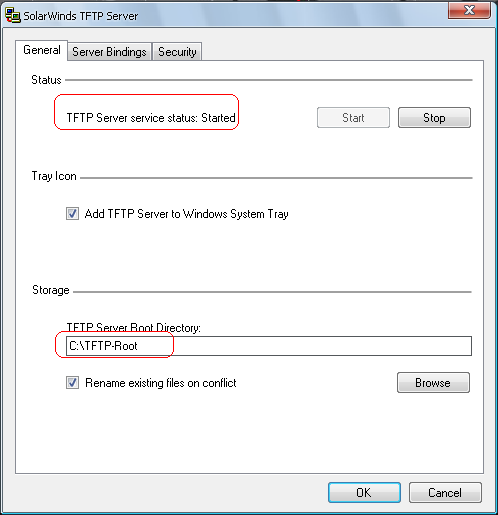
Các bạn download chương trình Solarwinds TFTP Server như hình bên dưới sau đó thiết lập 1 số các thông số sau:
-
Status: thể hiện thông báo chương trình đang chạy hay đang tắt
-
Storage: Đường dẫn lưu file.Bạn có thể tạo 1 thư mục sau đó trỏ đường dẫn vào đó.
-
Backup ra tftp server
Để backup file cấu hình từ bộ nhớ RAM của router ra tftp server ta dùng lệnh:
Router#copy running-config tftp
Address or name of remote host []? 10.10.10.10
Destination filename [ce_2-confg]? backup20101115_for_my_router
!!
1606 bytes copied in 2.489 secs (395 bytes/sec)
Để backup file cấu hình từ bộ nhớ NVRAM của router ra tftp server ta dùng lệnh:
Router#copy startup-config tftp
Address or name of remote host []? 10.10.10.10
Destination filename [ce_2-confg]? backup20101115_for_my_router
!!
1606 bytes copied in 2.489 secs (395 bytes/sec)
Để backup file image từ bộ nhớ flash của router ra tftp server ta dùng lệnh:
Router#copy flash: tftp
-
Restore từ tftp server
Để Upgrade file cấu hình từ tftp server vào bộ nhớ RAM của router ta dùng lệnh:
Router#copy tftp: running-config
Để Upgrade file cấu hình từ tftp server vào bộ nhớ NVRAM của router ta dùng lệnh:
Router#copy tftp: startup-config
Để Upgrade file image từ tftp server vào bộ nhớ flash của router dùng lệnh:
Router#copy flash: tftp:
Sau khi gõ các lệnh trên thì router sẽ hỏi địa chỉ tftp server, tên file backup trước đó.
- Xử lý điều kiện trong DB2
- BÌNH TĨNH TRƯỚC HỘP THƯ SỐ – NGHỆ THUẬT NHẬN DIỆN EMAIL PHISHING TỪ GÓC NHÌN NGHIỆP VỤ
- HÓA THÂN THÀNH "KẺ TẤN CÔNG": KHI HIỂU RÕ CẠM BẪY, TA PHÒNG THỦ VỮNG VÀNG HƠN
- CÁC CÔNG CỤ XÂY DỰNG GIAO DIỆN ỨNG DỤNG BẰNG TRÍ TUỆ NHÂN TẠO (AI)
- Silent Lynx khai thác lỗ hổng WinRAR để triển khai Reverse Shell nhằm tấn công các cơ quan chính phủ