



Load Balancing with OSPF
Cho sơ đồ mạng như sau:

Hãy cấu hình Load balancing với OSPF.
Sơ đồ demo trên EVE-NG:
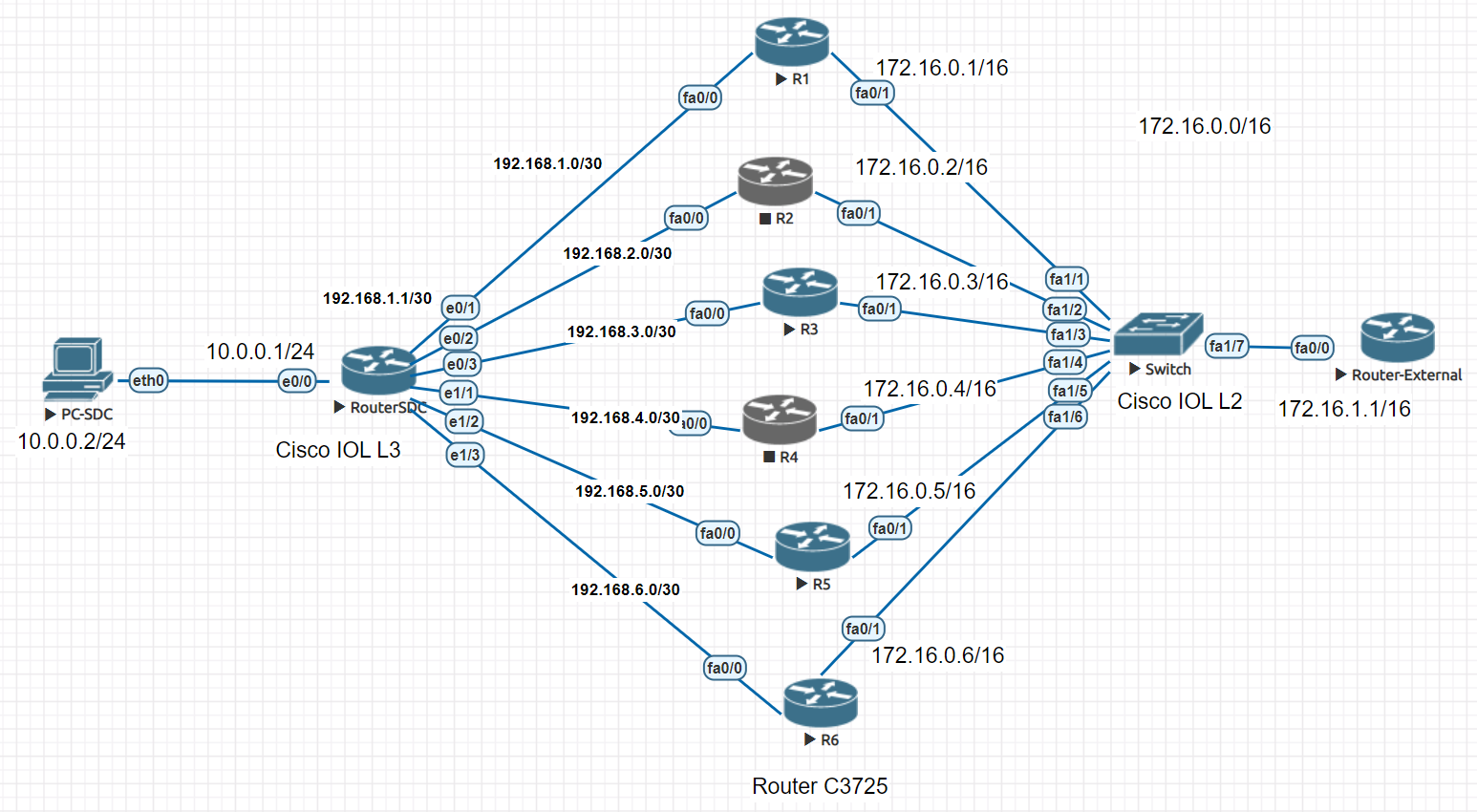
Trên Router-SDC:
en
conf t
hostname Router-SDC
int e0/0
no sh
ip add 10.0.0.1 255.255.255.0
ex
int e0/1
no sh
ip add 192.168.1.1 255.255.255.252
ex
int e0/2
no sh
ip add 192.168.2.1 255.255.255.252
ex
int e0/3
no sh
ip add 192.168.3.1 255.255.255.252
ex
int e1/1
no sh
ip add 192.168.4.1 255.255.255.252
ex
int e1/2
no sh
ip add 192.168.5.1 255.255.255.252
ex
int e1/3
no sh
ip add 192.168.6.1 255.255.255.252
ex
router ospf 100
maximum-paths 6
network 192.168.0.0 0.0.7.255 area 0
network 10.0.0.0 0.0.0.255 area 0
exit
int range e0/1 - 3
ip ospf cost 5
ex
int range e1/1 - 3
ip ospf cost 5
ex
end
write
Lưu ý: Nếu có sự thay đổi về cấu hình OSPF thì nhớ gõ lệnh clear ip ospf process để Router khởi động lại các tiến trình OSPF.
Trên Router R1:
en
conf t
hostname R1
int f0/0
no sh
ip add 192.168.1.2 255.255.255.252
ex
int f0/1
no sh
ip add 172.16.0.1 255.255.0.0
ex
router ospf 100
network 192.168.1.0 0.0.0.3 area 0
network 172.16.0.0 0.0.255.255 area 0
ex
end
write
Trên Router R2:
en
conf t
hostname R2
int f0/0
no sh
ip add 192.168.2.2 255.255.255.252
ex
int f0/1
no sh
ip add 172.16.0.2 255.255.0.0
ex
router ospf 100
network 192.168.2.0 0.0.0.3 area 0
network 172.16.0.0 0.0.255.255 area 0
ex
end
write
Trên Router R3:
en
conf t
hostname R3
int f0/0
no sh
ip add 192.168.3.2 255.255.255.252
ex
int f0/1
no sh
ip add 172.16.0.3 255.255.0.0
ex
router ospf 100
network 192.168.3.0 0.0.0.3 area 0
network 172.16.0.0 0.0.255.255 area 0
ex
end
write
Trên Router R4:
en
conf t
hostname R4
int f0/0
no sh
ip add 192.168.4.2 255.255.255.252
ex
int f0/1
no sh
ip add 172.16.0.4 255.255.0.0
ex
router ospf 100
network 192.168.4.0 0.0.0.3 area 0
network 172.16.0.0 0.0.255.255 area 0
ex
end
write
Trên Router R5:
en
conf t
hostname R5
int f0/0
no sh
ip add 192.168.5.2 255.255.255.252
ex
int f0/1
no sh
ip add 172.16.0.5 255.255.0.0
ex
router ospf 100
network 192.168.5.0 0.0.0.3 area 0
network 172.16.0.0 0.0.255.255 area 0
ex
end
write
Trên Router R6:
en
conf t
hostname R6
int f0/0
no sh
ip add 192.168.6.2 255.255.255.252
ex
int f0/1
no sh
ip add 172.16.0.6 255.255.0.0
ex
router ospf 100
network 192.168.6.0 0.0.0.3 area 0
network 172.16.0.0 0.0.255.255 area 0
ex
end
write
Trên Router-External:
en
conf t
hostname Router-External
int f0/0
no sh
ip add 172.16.1.1 255.255.0.0
ex
router ospf 100
network 172.16.0.0 0.0.255.255 area 0
ex
end
write
Dùng các câu lệnh show để kiểm tra thông tin cấu hình
Router-SDC#sh ip route
Codes: L - local, C - connected, S - static, R - RIP, M - mobile, B - BGP
D - EIGRP, EX - EIGRP external, O - OSPF, IA - OSPF inter area
N1 - OSPF NSSA external type 1, N2 - OSPF NSSA external type 2
E1 - OSPF external type 1, E2 - OSPF external type 2
i - IS-IS, su - IS-IS summary, L1 - IS-IS level-1, L2 - IS-IS level-2
ia - IS-IS inter area, * - candidate default, U - per-user static route
o - ODR, P - periodic downloaded static route, H - NHRP, l - LISP
a - application route
+ - replicated route, % - next hop override
Gateway of last resort is not set
10.0.0.0/8 is variably subnetted, 2 subnets, 2 masks
C 10.0.0.0/24 is directly connected, Ethernet0/0
L 10.0.0.1/32 is directly connected, Ethernet0/0
O 172.16.0.0/16 [110/15] via 192.168.6.2, 00:01:40, Ethernet1/3
[110/15] via 192.168.5.2, 00:01:40, Ethernet1/2
[110/15] via 192.168.4.2, 00:01:40, Ethernet1/1
[110/15] via 192.168.3.2, 00:01:40, Ethernet0/3
[110/15] via 192.168.2.2, 00:01:40, Ethernet0/2
[110/15] via 192.168.1.2, 00:01:40, Ethernet0/1
192.168.1.0/24 is variably subnetted, 2 subnets, 2 masks
C 192.168.1.0/30 is directly connected, Ethernet0/1
L 192.168.1.1/32 is directly connected, Ethernet0/1
192.168.2.0/24 is variably subnetted, 2 subnets, 2 masks
C 192.168.2.0/30 is directly connected, Ethernet0/2
L 192.168.2.1/32 is directly connected, Ethernet0/2
192.168.3.0/24 is variably subnetted, 2 subnets, 2 masks
C 192.168.3.0/30 is directly connected, Ethernet0/3
L 192.168.3.1/32 is directly connected, Ethernet0/3
192.168.4.0/24 is variably subnetted, 2 subnets, 2 masks
C 192.168.4.0/30 is directly connected, Ethernet1/1
L 192.168.4.1/32 is directly connected, Ethernet1/1
192.168.5.0/24 is variably subnetted, 2 subnets, 2 masks
C 192.168.5.0/30 is directly connected, Ethernet1/2
L 192.168.5.1/32 is directly connected, Ethernet1/2
192.168.6.0/24 is variably subnetted, 2 subnets, 2 masks
C 192.168.6.0/30 is directly connected, Ethernet1/3
L 192.168.6.1/32 is directly connected, Ethernet1/3
Router-SDC#
Router-SDC#show ip ospf neighbor
Neighbor ID Pri State Dead Time Address Interface
192.168.6.2 1 FULL/DR 00:00:33 192.168.6.2 Ethernet1/3
192.168.5.2 1 FULL/DR 00:00:32 192.168.5.2 Ethernet1/2
192.168.4.2 1 FULL/DR 00:00:33 192.168.4.2 Ethernet1/1
192.168.3.2 1 FULL/DR 00:00:35 192.168.3.2 Ethernet0/3
192.168.2.2 1 FULL/DR 00:00:30 192.168.2.2 Ethernet0/2
192.168.1.2 1 FULL/DR 00:00:33 192.168.1.2 Ethernet0/1
Router-SDC#
Lưu ý: Khi mượn Cisco IOS là Router để giả lập Switch thì các port trên Router có thể phải thêm lệnh "switchport".
(config)# interface range F1/1 - 15
(config-if-range)# switchport
Configuring OSPF Plaintext Password Authentication
router ospf 100
area 0 authentication message-digest
exit
do wr
//Cấu hình trên tất cả các Router trong OSPF Area 0
Plaintext Password Authentication Configuration Example
Sơ đồ: Router-SDC(e0/1) < —----- > (f0/0)R1
R1(config)#int f0/0
R1(config-if)#ip ospf authentication
R1(config-if)#ip ospf authentication-key sdc123
R1(config-if)#do wr
Router-SDC(config)#int e0/1
Router-SDC(config-if)#ip ospf authentication
Router-SDC(config-if)#ip ospf authentication-key sdc123
Router-SDC(config-if)#end
Router-SDC#wr
By: dangocuong@duytan.edu.vn
- BÌNH TĨNH TRƯỚC HỘP THƯ SỐ – NGHỆ THUẬT NHẬN DIỆN EMAIL PHISHING TỪ GÓC NHÌN NGHIỆP VỤ
- HÓA THÂN THÀNH "KẺ TẤN CÔNG": KHI HIỂU RÕ CẠM BẪY, TA PHÒNG THỦ VỮNG VÀNG HƠN
- CÁC CÔNG CỤ XÂY DỰNG GIAO DIỆN ỨNG DỤNG BẰNG TRÍ TUỆ NHÂN TẠO (AI)
- Silent Lynx khai thác lỗ hổng WinRAR để triển khai Reverse Shell nhằm tấn công các cơ quan chính phủ
- Thông tin xác thực ConnectWise bị chiếm dụng, 173 môi trường Microsoft 365 bị truy cập trái phép