



Triển khai Apache Web Server - Phần 2
2) Use Perl Script
Cấu hình httpd để dùng Perl như là CGI Scripts.
[1] Cài đặt ngôn ngữ Perl.
[root@dtu ~]# yum -y install perl perl-CGI

[2] Cấu hình httpd.
[root@dtu ~]# vi /etc/httpd/conf/httpd.conf
# line 576: by default, it is allowed to use CGI scripts under the "/var/www/cgi-bin/".
# but all files under it is looked as CGI by default.
ScriptAlias /cgi-bin/ "/var/www/cgi-bin/"
# if you use CGI scripts under any directory and specify files for CGI, add settings like follows
# line 331: change ( enable CGI, remove Indexes )
Options FollowSymLinks ExecCGI
# line 796: uncomment and add extentions for CGI
AddHandler cgi-script .cgi .pl
[root@dtu ~]# /etc/rc.d/init.d/httpd restart
Stopping httpd: [ OK ]
Starting httpd: [ OK ]
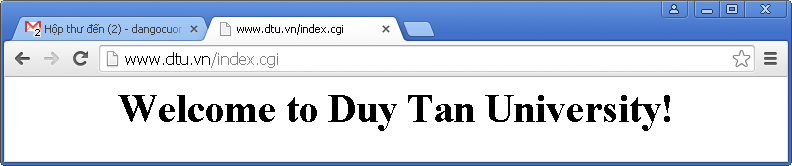
[3] Tạo một trang CGI test & dùng trình duyệt truy cập để kiểm tra nó đã hoạt động đúng chưa.
[root@dtu ~]# vi /var/www/html/index.cgi
#!/usr/bin/perl
print "Content-type: text/html\n\n";
print "\n\n";
print "
print "Welcome to Duy Tan University!";
print "\n\n";
print "\n\n";
[root@dtu ~]# chmod 705 /var/www/html/index.cgi
3) Use PHP Script
Cài đặt PHP để dùng PHP Script trên httpd.
[1] Cài đặt PHP.
[root@dtu ~]# yum -y install php php-mbstring php-pear
[root@dtu ~]# vi /etc/httpd/conf/httpd.conf
# line 402: add file name that it can access only with directory's name
DirectoryIndex index.html index.php
[root@dtu ~]# vi /etc/php.ini
# line 946: set you timezone
date.timezone = "Asia/Ho_Chi_Minh"
[root@dtu ~]# /etc/rc.d/init.d/httpd restart
Stopping httpd: [ OK ]
Starting httpd: [ OK ]
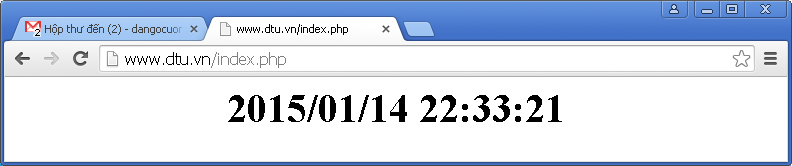
[2] Tạo 1 trang PHP test & sử dụng trình duyệt truy cập vào Web Server từ Client để kiểm tra nó đã hoạt động đúng chưa.
[root@dtu ~]# vi /var/www/html/index.php
print Date("Y/m/d H:i:s");
?>
4) Use Ruby Script
Cấu hình httpd để dùng Ruby như CGI Scripts.
[1] Cài đặt Ruby.
[root@dtu ~]# yum -y install ruby
[2] Cấu hình httpd.
[root@dtu ~]# vi /etc/httpd/conf/httpd.conf
# 576: by default, it is allowed to use CGI scripts under the "/var/www/cgi-bin/".
# but all files under it is looked as CGI by default.
ScriptAlias /cgi-bin/ "/var/www/cgi-bin/"
# if you use CGI scripts under any directory and specify files for CGI, add settings like follows
# line 331: change ( enable CGI, remove Indexes )
Options FollowSymLinks ExecCGI
# line 796: uncomment and add extentions for CGI
AddHandler cgi-script .cgi .rb
[root@dtu ~]# /etc/rc.d/init.d/httpd restart
Stopping httpd: [ OK ]
Starting httpd: [ OK ]
[3] Tạo 1 trang Ruby test & sử dụng trình duyệt truy cập vào Web Server từ Client để kiểm tra nó đã hoạt động đúng chưa.
[root@dtu ~]# vi /var/www/html/index.rb
#!/usr/bin/ruby
print "Content-type: text/html\n\n"
print "\n\n"
print "
print Time.now.strftime('%Y/%m/%d %H:%M:%S')
print "\n\n"
print "\n\n"
[root@dtu ~]# chmod 705 /var/www/html/index.rb

- Xử lý điều kiện trong DB2
- BÌNH TĨNH TRƯỚC HỘP THƯ SỐ – NGHỆ THUẬT NHẬN DIỆN EMAIL PHISHING TỪ GÓC NHÌN NGHIỆP VỤ
- HÓA THÂN THÀNH "KẺ TẤN CÔNG": KHI HIỂU RÕ CẠM BẪY, TA PHÒNG THỦ VỮNG VÀNG HƠN
- CÁC CÔNG CỤ XÂY DỰNG GIAO DIỆN ỨNG DỤNG BẰNG TRÍ TUỆ NHÂN TẠO (AI)
- Silent Lynx khai thác lỗ hổng WinRAR để triển khai Reverse Shell nhằm tấn công các cơ quan chính phủ