



XÁC THỰC 2 BƯỚC CHO CÁC TRUY CẬP TỪ XA DÙNG SSH - Phần 2
1.2.2. Triển khai hệ thống
Sau khi kiểm tra địa chỉ IP hoặc hostname của máy chủ ta truy cập vào với tài khoản và mật khẩu được cấp bằng công cụ Secure Shell Client, ở lần truy cập khi chưa cài đặt hệ thống này, máy chủ sẽ yêu cầu máy khách nhập đúng mật khẩu được cấp
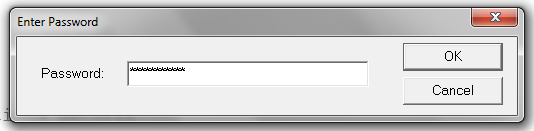
Hình 1.5 Đăng nhập hệ thống
Sau khi đăng nhập vào tài khoản root thành công, ta tiến hành cài đặt các gói tin cần thiết bằng câu lệnh:
# cd /usr/local/src/
# yum install pam-devel make gcc-c++ wget
[root@SSHServer6 ~]# cd /usr/local/src/
[root@SSHServer6 src]# yum install pam-del make gcc-c++ wget
Loaded plugins: fastestmirror, refresh-packagekit, security
Setting up Install Process
base | 1.7 kB 00:00
base/primary_db | 1.6 MB 00:02
extras | 1.4 kB 00:00
extras/primary_db | 29 kB 00:00
updates | 1.4 kB 00:00
updates/primary_db | 1.1 MB 00:02
No package pam-del available.
Package 1:make-1.81-20.el6.i686 already installed and latest version
Resolving Dependencies
--> Running transaction check
---> Package gcc-c++.i686 0:4.4.7-11.el6 will be installed
--> Processing Dependency: libstdc++-devel = 4.4.7-11.el6 for package: gcc-c++-4.4.7-11.el6.i686
--> Processing Dependency: gcc = 4.4.7-11.el6 for package: gcc-c++-4.4.7-11.el6.i686
--> Processing Dependency: libmpfr.so.1 for package: gcc-c++-4.4.7-11.el6.i686
---> Package wget.i686 0:1.12-5.el6 will be updated
---> Package wget.i686 0:1.12-5.el6_6.1 will be an update
--> Running transaction check
---> Package gcc.i686 0:4.4.7-11.el6 will be installed
--> Processing Dependency: cpp = 4.4.7-11.el6 for package: gcc-4.4.7-11.el6.i686
--> Processing Dependency: cloog-ppl >= 0.15 for package: gcc-4.4.7-11.el6.i686
---> Package libstdc++-devel.i686 0:4.4.7-11.el6 will be installed
---> Package mpfr.i686 0:2.4.1-6.el6 will be installed
--> Running transaction check
---> Package cloog-ppl.i686 0:0.15.7-1.2.el6 will be installed
--> Processing Dependency: libppl_c.so.2 for package: cloog-ppl-0.15.7-1.2.el6.i686
--> Processing Dependency: libppl.so.7 for package: cloog-ppl-0.15.7-1.2.el6.i686
---> Package cpp.i686 0:4.4.7-11.el6 will be installed
--> Running transaction check
---> Package ppl.i686 0:0.10.2-11.el6 will be installed
--> Finished Dependency Resolution
Dependencies Resolved
=============================================================
Package Arch Version Repository Size
=============================================================
Installing:
gcc-c++ i686 4.4.7-11.el6 base 4.3 M
Updating:
wget i686 1.12-5.el6_6.1 updates 483 k
Installing for dependencies:
cloog-ppl i686 0.15.7-1.2.el6 base 93 k
cpp i686 4.4.7-11.el6 base 1.4 M
gcc i686 4.4.7-11.el6 base 8.2 M
libstdc++-devel i686 4.4.7-11.el6 base 1.6 M
mpfr i686 2.4.1-6.el6 base 153 k
ppl i686 0.10.2-11.el6 base 1.3 M
Transaction Summary
=============================================================
Install 7 Package(s)
Upgrade 1 Package(s)
Total download size: 19 M
Is this ok [y/N]: y
Downloading Packages:
(1/8): cloog-ppl-0.15.7-1.2.el6.i686.rpm | 93 kB 00:00
(2/8): cpp-4.4.7-11.el6.i686.rpm | 1.4 MB 00:02
(3/8): gcc-4.4.7-11.el6.i686.rpm | 8.2 MB 00:05
(4/8): gcc-c++-4.4.7-11.el6.i686.rpm | 4.3 MB 00:03
(5/8): libstdc++-devel-4.4.7-11.el6.i686.rpm | 1.6 MB 00:01
(6/8): mpfr-2.4.1-6.el6.i686.rpm | 153 kB 00:00
(7/8): ppl-0.10.2-11.el6.i686.rpm | 1.3 MB 00:00
(8/8): wget-1.12-5.el6_6.1.i686.rpm | 483 kB 00:00
-------------------------------------------------------------
Total 1.4 MB/s | 19 MB 00:14
warning: rpmts_HdrFromFdno: Header V3 RSA/SHA1 Signature, key ID c105b9de: NOKEY
Retrieving key from file:///etc/pki/rpm-gpg/RPM-GPG-KEY-CentOS-6
Importing GPG key 0xC105B9DE:
Userid : CentOS-6 Key (CentOS 6 Official Signing Key)
Package: centos-release-6-6.el6.centos.12.2.i686 (@anaconda-CentOS-201410241409.i386/6.6)
From : /etc/pki/rpm-gpg/RPM-GPG-KEY-CentOS-6
Is this ok [y/N]: y
Running rpm_check_debug
Running Transaction Test
Transaction Test Succeeded
Running Transaction
Installing : libstdc++-devel-4.4.7-11.el6.i686 1/9
Installing : mpfr-2.4.1-6.el6.i686 2/9
Installing : cpp-4.4.7-11.el6.i686 3/9
Installing : ppl-0.10.2-11.el6.i686 4/9
Installing : cloog-ppl-0.15.7-1.2.el6.i686 5/9
Installing : gcc-4.4.7-11.el6.i686 6/9
Installing : gcc-c++-4.4.7-11.el6.i686 7/9
Updating : wget-1.12-5.el6_6.1.i686 8/9
Cleanup : wget-1.12-5.el6.i686 9/9
Verifying : libstdc++-devel-4.4.7-11.el6.i686 1/9
Verifying : cpp-4.4.7-11.el6.i686 2/9
Verifying : wget-1.12-5.el6_6.1.i686 3/9
Verifying : mpfr-2.4.1-6.el6.i686 4/9
Verifying : ppl-0.10.2-11.el6.i686 5/9
Verifying : gcc-c++-4.4.7-11.el6.i686 6/9
Verifying : gcc-4.4.7-11.el6.i686 7/9
Verifying : cloog-ppl-0.15.7-1.2.el6.i686 8/9
Verifying : wget-1.12-5.el6.i686 9/9
Installed:
gcc-c++.i686 0:4.4.7-11.el6
Dependency Installed:
cloog-ppl.i686 0:0.15.7-1.2.el6 cpp.i686 0:4.4.7-11.el6 gcc.i686 0:4.4.7-11.el6 libstdc++-devel.i686 0:4.4.7-11.el6
mpfr.i686 0:2.4.1-6.el6 ppl.i686 0:0.10.2-11.el6
Updated:
wget.i686 0:1.12-5.el6_6.1
Complete!
Tiếp theo tải ứng dụng hỗ trợ chứng thực về phía máy chủ bằng câu lệnh:
# cd /root/
# wget https://google-authenticator.googlecode.com/files/libpam-google-authenticator-1.0-source.tar.bz2
[root@SSHServer6 src]# cd /root/
[root@SSHServer6 ~]# wget https://google-authenticator.googlecode.com/files/libpam-google-authenticator-1.0-source.tar.bz2
--2015-05-16 03:17:22-- https://google-authenticator.googlecode.com/files/libpam-google-authenticator-1.0-source.tar.bz2
Resolving google-authenticator.googlecode.com... 74.125.68.82, 2404:6800:4003:c02::52
Connecting to google-authenticator.googlecode.com|74.125.68.82|:441... connected.
HTTP request sent, awaiting response... 200 OK
Length: 32708 (32K) [application/x-bzip2]
Saving to: âlibpam-google-authenticator-1.0-source.tar.bz2â
100%[========================>] 32,708 112K/s in 0.3s
2015-05-16 03:17:23 (112 KB/s) - âlibpam-google-authenticator-1.0-source.tar.bz2âsaved [32708/32708]
Tiếp theo tiến hành giải nén gói ứng dụng bằng câu lệnh:
# bunzip2 libpam-google-authenticator-1.0-source.tar.bz2
# tar -xvf libpam-google-authenticator-1.0-source.tar
[root@SSHServer6 ~]# bunzip2 libpam-google-authenticator-1.0-source.tar.bz2
[root@SSHServer6 ~]# tar -xvf libpam-google-authenticator-1.0-source.tar
libpam-google-authenticator-1.0/base32.c
libpam-google-authenticator-1.0/demo.c
libpam-google-authenticator-1.0/google-authenticator.c
libpam-google-authenticator-1.0/hmac.c
libpam-google-authenticator-1.0/pam_google_authenticator.c
libpam-google-authenticator-1.0/pam_google_authenticator_unittest.c
libpam-google-authenticator-1.0/sha1.c
libpam-google-authenticator-1.0/base32.h
libpam-google-authenticator-1.0/hmac.h
libpam-google-authenticator-1.0/sha1.h
libpam-google-authenticator-1.0/totp.html
libpam-google-authenticator-1.0/Makefile
libpam-google-authenticator-1.0/FILEFORMAT
libpam-google-authenticator-1.0/README
libpam-google-authenticator-1.0/utc-time/
libpam-google-authenticator-1.0/utc-time/app.yaml
libpam-google-authenticator-1.0/utc-time/utc-time.py
Tiếp theo chuyển vào thư mục chứa mã nguồn vừa giải nén, biên dịch mã nguồn và cài đặt mã nguồn vừa biên dịch bằng các câu lệnh sau:
# cd libpam-google-authenticator-1.0
# make
# make install
[root@SSHServer6 libpam-google-authenticator-1.0]# make
gcc --std=gnu99 -Wall -O2 -g -fPIC -c -fvisibility=hidden -o google-authenticator.o google-authenticator.c
gcc --std=gnu99 -Wall -O2 -g -fPIC -c -fvisibility=hidden -o base32.o base32.c
gcc --std=gnu99 -Wall -O2 -g -fPIC -c -fvisibility=hidden -o hmac.o hmac.c
gcc --std=gnu99 -Wall -O2 -g -fPIC -c -fvisibility=hidden -o sha1.o sha1.c
gcc -g -o google-authenticator google-authenticator.o base32.o hmac.o sha1.o -ldl
gcc --std=gnu99 -Wall -O2 -g -fPIC -c -fvisibility=hidden -o pam_google_authenticator.o pam_google_authenticator.c
gcc -shared -g -o pam_google_authenticator.so pam_google_authenticator.o base32.o hmac.o sha1.o -lpam
gcc --std=gnu99 -Wall -O2 -g -fPIC -c -fvisibility=hidden -o demo.o demo.c
gcc -DDEMO --std=gnu99 -Wall -O2 -g -fPIC -c -fvisibility=hidden -o pam_google_authenticator_demo.o pam_google_authenticator.c
gcc -g -rdynamic -o demo demo.o pam_google_authenticator_demo.o base32.o hmac.o sha1.o -ldl
gcc -DTESTING --std=gnu99 -Wall -O2 -g -fPIC -c -fvisibility=hidden \
-o pam_google_authenticator_testing.o pam_google_authenticator.c
gcc -shared -g -o pam_google_authenticator_testing.so pam_google_authenticator_testing.o base32.o hmac.o sha1.o -lpam
gcc --std=gnu99 -Wall -O2 -g -fPIC -c -fvisibility=hidden -o pam_google_authenticator_unittest.o pam_google_authenticator_unittest.c
gcc -g -rdynamic -o pam_google_authenticator_unittest pam_google_authenticator_unittest.o base32.o hmac.o sha1.o -lc -ldl
[root@SSHServer6 libpam-google-authenticator-1.0]# make install
cp pam_google_authenticator.so /lib/security
cp google-authenticator /usr/local/bin
[root@SSHServer6 libpam-google-authenticator-1.0]#
Tiếp theo tiến hành tạo mã xác thực bằng câu lệnh sau:
# google-authenticator
[root@SSHServer6 libpam-google-authenticator-1.0]# google-authenticator
Do you want authentication tokens to be time-based (y/n) y
https://www.google.com/chart?chs=200x200&chld=M|0&cht=qr&chl=otpauth://totp/root@SSHServer6.4%3Fsecret%3D5VEVSEXJDMVO2KE3
Your new secret key is: 5VEVSEXJDMVO2KE3
Your verification code is 706920
Your emergency scratch codes are:
60933260
35575999
27437861
21298726
18035761
Do you want me to update your "/root/.google_authenticator" file (y/n) y
Do you want to disallow multiple uses of the same authentication
token? This restricts you to one login about every 30s, but it increases
your chances to notice or even prevent man-in-the-middle attacks (y/n) y
By default, tokens are good for 30 seconds and in order to compensate for
possible time-skew between the client and the server, we allow an extra
token before and after the current time. If you experience problems with poor
time synchronization, you can increase the window from its default
size of 1:30min to about 4min. Do you want to do so (y/n) y
If the computer that you are logging into isn't hardened against brute-force
login attempts, you can enable rate-limiting for the authentication module.
By default, this limits attackers to no more than 3 login attempts every 30s.
Do you want to enable rate-limiting (y/n) y
- GENERATE AI DIAGRAM TRONG VISUAL PARADIGM
- Khám phá ngành mạng máy tính: Cơ hội nghề nghiệp đột phá và tương lai định hình 2026
- QMIX – Kỹ thuật học tăng cường sâu đa tác tử cho các bài toán ra quyết định phối hợp
- Lỗ hổng nghiêm trọng trong Docker Sandboxes có thể cho phép mã độc truy cập tệp trên macOS host
- OpenAI công bố 6 sự cố liên quan đến hành vi bất thường của mô hình AI